What Is Red Hat OpenShift Virtualization?
OpenShift Virtualization is a Red Hat OpenShift feature that lets you run traditional Virtual Machines (VMs) alongside containers and serverless functions on a single platform, using KVM and KubeVirt to manage them like native Kubernetes objects for a unified hybrid cloud experience, simplifying migration and modernization for mixed workloads. It bridges the gap between legacy VM environments and modern cloud-native applications, allowing for integrated management, networking, and storage.
Key features and benefits:
- Unified platform: Manage VMs and containers on the same OpenShift cluster, reducing operational complexity.
- Container-native approach: VMs run as pods, leveraging Kubernetes’ orchestration for lifecycle management (start, stop, restart).
- Hybrid cloud mobility: Easily migrate and run VMs across on-premises and public cloud environments.
- Modernization: Transition legacy VM applications to a cloud-native platform without a complete rewrite.
- Integrated ecosystem: Use familiar OpenShift tools for compute, storage, and networking for both workloads.
- Supports diverse architectures: Now supports ARM-based hardware for unified management across different CPU types.
Common use cases:
- Bridging gaps: Running older VM applications that need to interact with newer containerized services.
- Disaster recovery: Implementing robust backup, replication, and failover for VMs.
- Infrastructure consolidation: Running diverse workloads (VMs, containers, AI) on shared hardware for efficiency.
This is part of a series of articles about Red Hat OpenShift
Table of Contents
ToggleKey Features and Benefits of OpenShift Virtualization
Unified Platform
OpenShift virtualization delivers a single control plane for VMs and containers, simplifying day-to-day management across both workload types. Operators can provision, deploy, and scale containerized applications and virtual machines using the same OpenShift web console and command-line tools.
Operational consistency is further supported by unified networking, storage, and security policies. Teams gain granular control over resources and permissions, simplifying compliance and governance processes. End-to-end automation and observability across all workloads enhance developer productivity and simplify troubleshooting.
Container-Native Approach
OpenShift virtualization leverages Kubernetes primitives and APIs to manage virtual machines as first-class citizens. Each VM becomes a Kubernetes object, benefiting from features like namespaces, RBAC, and resource quotas. This approach allows teams to manage VMs through the same CI/CD pipelines, GitOps workflows, and automation strategies used for containers, maximizing agility and accelerating software delivery.
Native integration with container technologies enables hybrid workloads, such as coupling legacy applications inside VMs with modern microservices. Developers can use Kubernetes-native tools like Operators and Helm charts to manage, update, and observe both virtual machines and containers.
Hybrid Cloud Mobility
With OpenShift virtualization, workloads can be moved fluidly between on-premises and cloud environments. VMs and containers coexist on the same clusters and can migrate between different infrastructures without the complexity of traditional virtualization stacks. This mobility helps organizations avoid vendor lock-in, optimize costs, and respond rapidly to changing business needs or compliance requirements.
Live migration capabilities further support workload mobility, reducing downtime during infrastructure maintenance or scaling events. Workloads can be balanced across clusters or moved to public clouds for disaster recovery, seasonal scaling, or geographic optimization.
Modernization
OpenShift virtualization enables gradual modernization of legacy workloads by letting teams run existing VMs on a Kubernetes-native platform. Applications that are not yet container-ready can continue to operate in VMs, while new workloads or microservices are natively deployed in containers, all managed side-by-side.
As organizations rewrite or repackage legacy applications, they can decommission VMs and shift to containers seamlessly on the same platform. The unified control plane accelerates modernization initiatives and bridges gaps between infrastructure teams, allowing for faster delivery cycles, reduced technical debt, and lower operating costs compared to managing separate environments.
Integrated Ecosystem
OpenShift virtualization benefits from tight integration with Red Hat’s certified ecosystem of tools and partner technologies. Networking, storage, monitoring, and security solutions from Red Hat and third parties are available out-of-the-box. Existing OpenShift clusters can leverage their ecosystem investments to support VM workloads, extending mature DevOps and monitoring workflows directly to legacy applications.
This integrated environment simplifies vendor management and reduces friction when scaling or optimizing workloads. Teams can use familiar OpenShift management interfaces, benefit from Red Hat support, and capitalize on tested integrations with backup, compliance, and automation tools, ensuring production readiness for both containers and VMs.
Supports Diverse Architectures
OpenShift virtualization is designed for flexibility across multiple deployment scenarios, including private, public, and hybrid clouds. It can run on physical or virtual infrastructure and supports a range of hardware architectures and acceleration features through integration with technologies like SR-IOV for high-performance networking or GPUs for specialized workloads.
Support for diverse architectures ensures that organizations can optimize application performance, leverage existing hardware investments, and accommodate specialized workloads such as AI/ML, NFV, or high-throughput transactional applications. This flexibility supports growth and innovation without locking organizations into a single infrastructure model.
Related content: Read our guide to OpenShift pricing (coming soon)
How OpenShift Virtualization Architecture Works
KubeVirt Control Plane
The core of OpenShift virtualization is built on KubeVirt, which runs several custom Kubernetes controllers and components to manage virtual machines. The primary control plane components include virt-controller, which manages the lifecycle and orchestration of VM resources, and virt-handler, which runs on every node in the cluster to monitor and support active VMs. These components ensure VMs are instantiated, monitored, and cleaned up according to Kubernetes lifecycle events, leveraging established container orchestration primitives.
virt-launcher is responsible for launching and managing VM processes isolated inside Kubernetes pods. On the node, libvirtd and qemu-kvm provide the necessary virtualization backend, enabling hardware acceleration and direct interaction with VM operating systems.
Custom Resources
OpenShift virtualization extends Kubernetes’ API with several custom resources for managing virtual machines and their associated assets. The VirtualMachine resource describes the configuration and intended state of a VM, while the VirtualMachineInstance defines the running state and lifecycle of the VM on the cluster. These custom resources expose familiar declarative management, enabling VMs to be integrated into GitOps workflows and infrastructure-as-code pipelines.
Other custom resources like DataVolume enable dynamic creation and population of persistent storage for VMs, supporting workflows such as image imports, cloning, and backups. Instancetype and Preference CRs provide VM sizing templates and user preferences, standardizing deployments and ensuring consistent configurations across teams or projects.
Networking Model
Networking for OpenShift virtualization leverages both Kubernetes-native and advanced networking features. Multus, a CNI plugin, enables attaching multiple network interfaces to pods running VMs, allowing for separate control and data plane networks or integration with legacy VLANs. Pods use the default pod network for management traffic, while additional networks can be set up using custom bridges, bonds, or direct SR-IOV attachment for high-performance requirements.
Specialized networking options, including live-migration networks, enable seamless VM migrations with minimized downtime and data loss. These configurations are critical for enterprise workloads that require high availability, guaranteed bandwidth, or complex topologies. Integrating these capabilities within the OpenShift networking stack ensures that both VMs and containers can share and manage networking resources efficiently.
Storage Model
OpenShift virtualization provides storage integration through Kubernetes persistent volume claims (PVCs), allowing VMs to attach persistent block or file storage managed by OpenShift. The containerized data importer (CDI) service simplifies importing VM images, cloning PVCs, and automating disk provisioning workflows. VolumeSnapshots enable point-in-time backups and rapid recovery of VM disks, essential for data protection and disaster recovery scenarios.
Storage access modes, like ReadWriteOnce (RWO) and ReadWriteMany (RWX), dictate whether a PVC can be mounted by a single VM or shared across multiple instances or pods. Boot-from-PVC enables VMs to start directly from persistent volumes, supporting consistent and repeatable deployments. These storage models ensure robust lifecycle management, efficient data migration, and reliability for both legacy VMs and containerized applications.
Scheduling and Placement
OpenShift virtualization takes advantage of Kubernetes advanced scheduling features to optimize VM placement and performance. NUMA (non-uniform memory access) awareness ensures optimal memory access and compute efficiency for workloads sensitive to hardware topology. The CPU Manager and Topology Manager work together to assign dedicated CPUs and align memory allocations, catering to performance-critical or latency-sensitive applications.
Administrators can use node labels, taints, and tolerations to fine-tune placement of VMs, assigning workloads only to appropriately configured nodes or isolating specialized workloads. These tools allow teams to segment infrastructure, enforce compliance, and optimize resource utilization, ensuring that both containers and VMs can run efficiently and reliably at scale.

Lanir specializes in founding new tech companies for Enterprise Software: Assemble and nurture a great team, Early stage funding to growth late stage, One design partner to hundreds of enterprise customers, MVP to Enterprise grade product, Low level kernel engineering to AI/ML and BigData, One advisory board to a long list of shareholders and board members of the worlds largest VCs
Tips from the Expert
In my experience, here are tips that can help you better run and migrate VM workloads on OpenShift Virtualization with fewer surprises and better long-term operability:
- Define a “vm landing zone” before the first migration: Create a standard set of namespaces, network attachment definitions, default VM instancetypes/preferences, and approved storage classes so every migrated VM lands in a predictable “shape” (and your day-2 ops aren’t a snowflake hunt).
- Treat image provenance as a supply-chain problem, not a one-time import: Build a small “golden image factory” pipeline: import → harden → scan → sign → publish as DataSources/DataVolumes. This prevents drift where each team imports random QCOWs/ISOs and you later can’t patch or trust what’s running.
- Separate “platform SLOs” from “application SLOs” for mixed VM+container clusters: Your OpenShift cluster health can be green while a VM app is slow due to storage latency, CPU pinning, or noisy neighbors. Create dashboards and alerts that map VM-level SLOs (disk latency, steal time equivalents, migration duration, ballooning) to app outcomes.
- Use explicit “eviction and disruption rules” for VM workloads: Decide which VMs are allowed to be evicted/migrated and which are not, then codify it with labels, PDB-style thinking, and maintenance windows. Otherwise, routine node work can turn into unplanned brownouts.
- Plan for “IP identity” early (DHCP, static, and DNS): VM migrations often fail socially, not technically: teams panic when IPs change or reverse DNS breaks. Standardize whether VMs get IPs from DHCP reservations, IPAM, or static inside-guest, and document the cutover pattern per app tier.
Common Use Cases of OpenShift Virtualization
Bridging Gaps
OpenShift virtualization offers a practical pathway for organizations to bridge the gap between traditional virtualized workloads and modern container environments. Many businesses have large investments in legacy applications that are difficult or impossible to refactor immediately. By running these workloads as virtual machines within OpenShift, teams can adopt Kubernetes-native workflows and gradually transition to containers.
This bridging capability also supports modernization of tools and pipelines. Teams can apply familiar automation, monitoring, and security controls across mixed workloads. As applications become container-ready, migration or refactoring is simplified by the existing integration within the OpenShift ecosystem, reducing both transition time and risk.
Disaster Recovery
Disaster recovery provides capabilities for workload replication, snapshotting, and migration across clusters and sites. Organizations can use persistent storage integrations, VolumeSnapshots, and backup solutions to protect VM-based applications and enable rapid restore or failover in case of outages or disaster scenarios. Live migration features enable moving running VMs with minimal downtime.
OpenShift’s cluster federation and hybrid cloud features make it possible to replicate VMs and state to remote or public cloud locations. This approach improves resilience and meets regulatory or business continuity requirements for critical applications, all managed within a unified OpenShift control plane.
Infrastructure Consolidation
Organizations often operate separate environments for containers and virtual machines, leading to redundant resources and management overhead. With OpenShift virtualization, these can be consolidated onto a single OpenShift cluster, reducing hardware footprint and simplifying IT operations. Teams benefit from unified monitoring, automation, and policy controls, enhancing operational efficiency and visibility while lowering total cost of ownership.
Infrastructure consolidation also enables better utilization of infrastructure resources. Workloads (whether VM-based or containerized) can be scheduled, scaled, or migrated dynamically across the same pool of compute, network, and storage, helping organizations respond quickly to changing demands and optimizing their cloud investment.
OpenShift Virtualization vs. VMware
OpenShift virtualization and VMware serve different operational models, though they both deliver mature enterprise virtualization features.
VMware offers a specialized virtualization platform with decades of maturity, focusing on traditional VMs, advanced hypervisor features, and tight integration with its own management, automation, and networking stacks. OpenShift virtualization instead uses Kubernetes and KubeVirt to bring VM management to the OpenShift container platform, focusing on unifying VM and container workflows under a single platform and API surface.
The two differ in terms of architecture, ecosystem, and cost. OpenShift virtualization lets organizations adopt cloud-native practices and DevOps workflows for both VMs and containers, offering flexibility to run hybrid or transitional environments. VMware is best for organizations that require deep hypervisor-level integrations and mature legacy virtualization features, but may lead to higher licensing costs and less flexibility in a cloud-native landscape.
Tutorial: Installing OpenShift Virtualization
This section walks through how to prepare your cluster and install OpenShift Virtualization using both the web console and CLI. It focuses on the required prerequisites, resource planning, and the actual installation steps.
Step 1: Prepare Your Cluster
Before installing, verify that your cluster meets the requirements.
Supported environments
- Bare metal servers (on-premises)
- AWS bare metal instances (technology preview)
- IBM Cloud bare metal servers (technology preview)
Avoid unsupported environments like non-bare-metal cloud instances.
CPU requirements
- Intel 64 or AMD64 processors
- Hardware virtualization enabled (Intel VT or AMD-V)
- NX (no execute) flag enabled
- Compatible with RHEL 8
Operating system
- Worker nodes must run Red Hat Enterprise Linux CoreOS (RHCOS)
- RHEL worker nodes are not supported
Important limitations
- Single-node clusters do not support live migration or high availability
- IPv6 single-stack clusters are not supported
- Mixed CPU types across nodes can break live migration
Step 2: Plan Resource Overhead
OpenShift Virtualization adds overhead on top of standard OpenShift resources. You need to account for this when sizing your cluster.
Memory overhead
- ~150 MiB per infrastructure node
- ~360 MiB per worker node
- ~2179 MiB total for virtualization components
Per VM:
(1.002 × VM memory) + 146 MiB + (8 MiB × vCPUs)
Add 1 GiB per GPU or SR-IOV device if used.
CPU overhead
- Infrastructure nodes: ~4 cores total
- Worker nodes: ~2 cores + VM CPU usage
Storage overhead
- ~10 GiB per node for virtualization components
If you oversubscribe resources, performance will degrade.
Step 3: (Optional) Configure Node Placement
You can control where virtualization components run.
Common goals:
- Run VMs only on specific worker nodes
- Isolate infrastructure components
- Prevent interference with other workloads
You configure placement using:
- nodeSelector (strict matching)
- affinity (flexible rules)
- tolerations (allow scheduling on tainted nodes)
Placement can be defined in:
- Operator Subscription (for operators)
- HyperConverged resource (for workloads)
- HostPathProvisioner (for storage)
Step 4: Install Using the Web Console
This is the simplest method.
- Go to Operators → OperatorHub
- Search for OpenShift Virtualization
- Select the operator and click Install
Configure:
- Update channel: stable
- Namespace: openshift-cnv (required)
- Approval strategy: Automatic (recommended)
After installation:
- Click Create HyperConverged
- (Optional) Configure node placement
- Click Create
Verify installation
- Go to Workloads → Pods
- Ensure all virtualization pods are in Running state
Step 5: Install Using the CLI
Use this method for automation or GitOps workflows.
1. Create required resources
apiVersion: v1
kind: Namespace
metadata:
name: openshift-cnv
—
apiVersion: operators.coreos.com/v1
kind: OperatorGroup
metadata:
name: kubevirt-hyperconverged-group
namespace: openshift-cnv
spec:
targetNamespaces:
– openshift-cnv
—
apiVersion: operators.coreos.com/v1alpha1
kind: Subscription
metadata:
name: hco-operatorhub
namespace: openshift-cnv
spec:
source: redhat-operators
sourceNamespace: openshift-marketplace
name: kubevirt-hyperconverged
channel: “stable”
Apply it:
oc apply -f install.yaml
2. Deploy the operator
apiVersion: hco.kubevirt.io/v1beta1
kind: HyperConverged
metadata:
name: kubevirt-hyperconverged
namespace: openshift-cnv
spec: {}
Apply:
oc apply -f hco.yaml
Verify installation
watch oc get csv -n openshift-cnv
You should see the status Succeeded.
Step 6: Enable virtctl (Optional but Recommended)
virtctl is a CLI tool for managing virtual machines.
Download
oc get ConsoleCLIDownload virtctl-clidownloads-kubevirt-hyperconverged -o yaml
Install (Linux example)
tar -xvf virtctl.tar.gz
chmod +x virtctl
mv virtctl /usr/local/bin/
Faddom: Application Dependency Mapping for OpenShift Environments
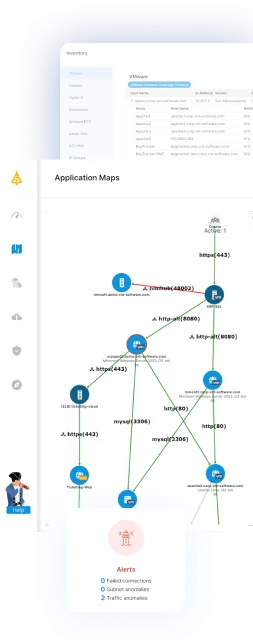
OpenShift Virtualization enables organizations to run VMs and containers on a unified platform, but managing dependencies across these mixed workloads remains complex. Without clear visibility into how applications, services, and infrastructure components interact, migration, modernization, and day-to-day operations can introduce unnecessary risk.
Faddom provides agentless, real-time application dependency mapping, giving teams a live view of how workloads communicate across hybrid environments, including OpenShift clusters. By continuously discovering servers, applications, and traffic flows, it helps organizations understand true dependencies before migrating workloads, assess the impact of changes, and maintain accurate CMDB data through integrations such as ServiceNow. This level of visibility supports safer modernization, better resource optimization, and more confident operations across both virtualized and containerized environments.
See Faddom in action in your environment by booking a demo with our experts!